Independent creative studio

We make screens feel like worlds.

Direction, design, motion, and digital experiences for brands, broadcasts, and creators, built as one connected visual language.

Enter the work

Selected work

Dark broadcast set with a large wall screen and a central desk

01 / Open

Broadcast environment

The Desk

A virtual set designed as a working surface.

Role
Direction + design
System
vMix + HTML graphics
Credit
Studio system
Year
2026
Enter the system

System evidence

The set is not a backdrop. It is a live surface.

The screen slot, camera zone, and graphics layer are composed as one broadcast environment. The technical overlay stays in the story because the system is part of the work.

Live screen
Mapped content surface
Camera
Defined working zone
Graphics
HTML layer in vMix
The Desk technical view with the live screen slot and camera zone outlined in red
Beauty frame becomes operating proof.

02 / Enter

Campaign world

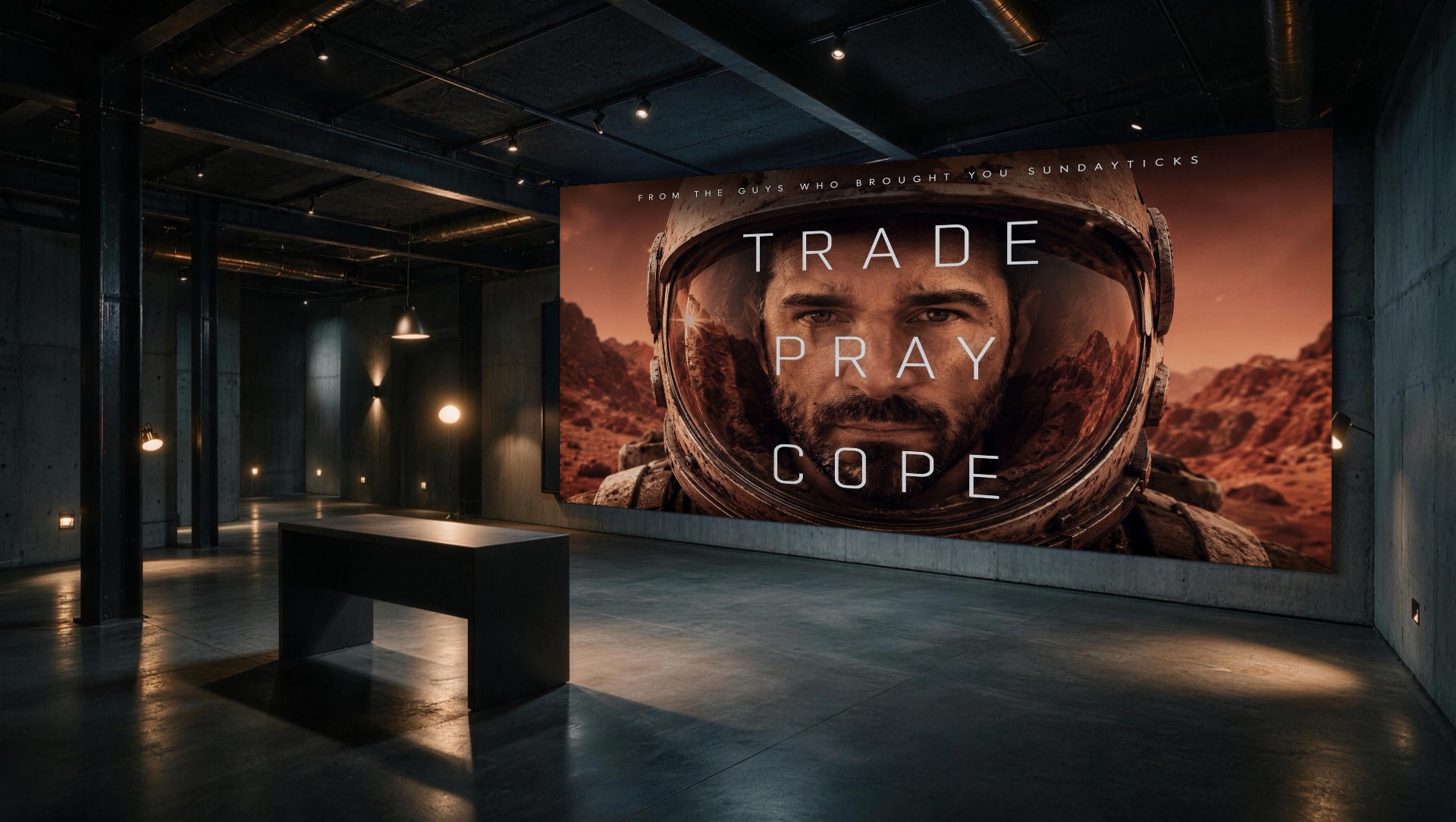
Trade.
Pray.
Cope.

An editorial sequence for the SundayTicks campaign, built from premise, motion, typography, and final frames.

Trade Pray Cope campaign key art showing an astronaut in a rust colored landscape
Title + premise. One strong visual idea opens the chapter.
Role
Direction + motion
Collaborator
SundayTicks
System
Editorial sequence + typography
Year
Not published

Edited sequence

Three cuts. One campaign world.

01 Motion cut
02 Character cut
03 Final cut

Text alternative: Three short campaign motion excerpts are presented as a single sequence. The key art and repeated title system connect each cut.

System + process

Premise first. Then motion, type, and final frames.

The chapter keeps the campaign idea visible while the media changes. Typography is the connective tissue, not a label added after the edit.

  1. 01 Establish the title and visual premise
  2. 02 Cut movement into a repeatable rhythm
  3. 03 Return to the key art as the final frame

03 / Prove

Virtual environments

One camera logic.
Three connected worlds.

The Stage, Command Room, and Loft demonstrate mapped surfaces and camera logic across different environments.

03A / Stage

A field of vertical surfaces.

Mapped panels form the image system. The central camera and projection zones keep the environment legible as a working stage.

Dark stage with a field of illuminated vertical panels The Stage technical view with camera and projection zones outlined in red
BeautyTechnical overlay

03B / Command Room

The monitor wall becomes a surface.

A live monitor wall and a defined camera zone turn the control environment into a coherent visual system.

Dark command room with monitor walls and a long control desk Command Room technical view with live monitor wall and camera zone outlined in red
BeautyTechnical overlay

03C / Loft

A window, a screen, a camera zone.

The live window and screen slots share one mapped scene, with a camera zone placed inside the environment.

Warm dark loft with a city window, work table, and wall screen Loft technical view with the window slot, screen slot, and camera zone outlined in red
BeautyTechnical overlay
Role
Direction + environment design
System
Mapped surfaces + camera logic
Credit
Studio environments
Year
Not published

Studio + process

Build the visual idea and the system together.

Every route starts with the thing the screen needs to do. The work moves from premise to system, sequence, and adaptable delivery.

  1. 01

    Frame the premise

    One clear reason for the project to exist.

  2. 02

    Design the system

    Surfaces, typography, motion, and camera logic in one language.

  3. 03

    Edit the sequence

    Use the work to set pace, context, and proof.

  4. 04

    Deliver for the screen

    Responsive media, clear controls, and the right route into use.

The fast lane / productized work

Defined scope. Published rate. Still crafted.

A transparent, written-first route for work that already fits a clear shape.

01

Virtual set

Mapped screens + camera layouts

From $299*
02

On-air kit

Defined scope

Written route
03

Launch page

Published rate

Digital surface
04

Campaign key art

Fast lane

Visual premise

Start a project

Start with the work. Bring the thing that needs to move.

Send the project details, the problem, or the rough reference. You get a written response with the right route: custom commission or fast lane.

hello@keyframe0.com

This prepares the details in your email app. Review, then send.